How to Deposit and Withdraw on Arcus (USDG, Cards, Bridges)
Table of Contents
- What USDG is, and why everything turns into it
- Before your first deposit
- Step 1: Choose where the money lands
- Step 2: Pick a route
- Route 1: Wallet
- Route 2: Transfer crypto
- Route 3: Connect exchange
- Route 4: Use cash
- Which route should you pick?
- Practice on testnet first
- What a deposit costs
- What happens behind the deposit screen
- How long it takes
- Do you need ETH for gas?
- How to withdraw from Arcus
- Why a withdrawal fails
- Where to get help
- Common snags and fixes
The short version
Click Deposit, choose whether the money lands in USDG (Spot) or USDG (Perps), then pay from a connected wallet, a crypto transfer, a Coinbase account or a card. It all arrives as USDG. To get money out, go Perps to Spot first, then Spot to another chain. Arcus adds no fee of its own either way.
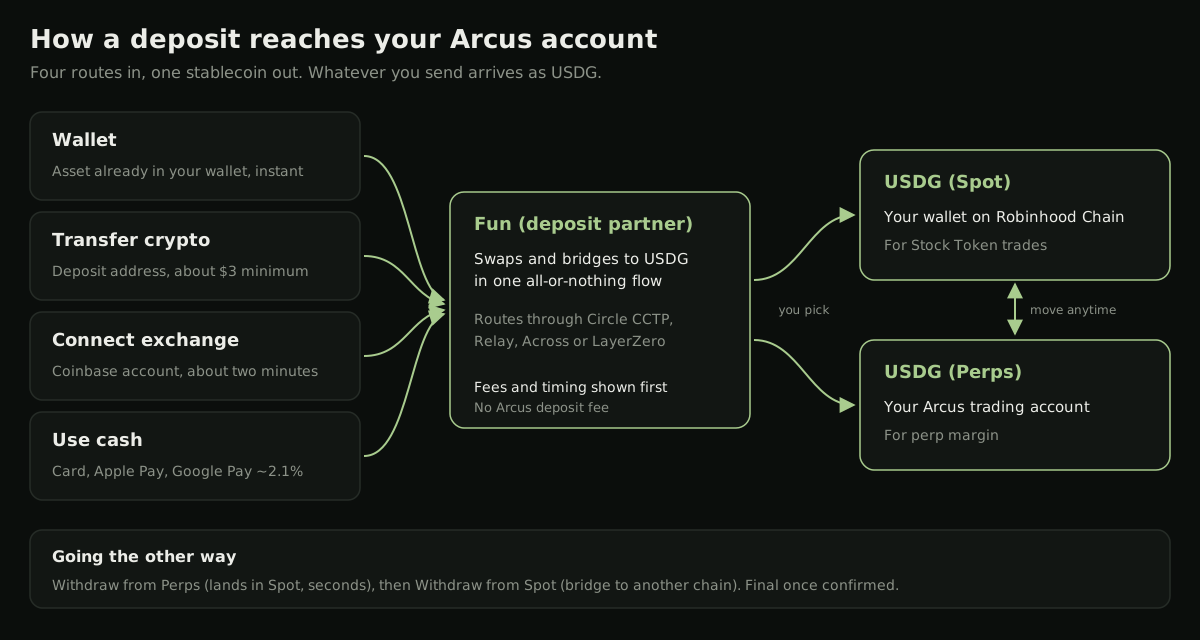
Funding  Arcus is simpler than on most decentralized exchanges because you never have to bridge to Robinhood Chain yourself. The deposit screen takes crypto from most major chains, a Coinbase balance or a card, and delivers one thing: USDG. Withdrawals are where people get stuck, because they run in two steps. This page covers both directions, what each route costs, and what to do when something stalls.
What USDG is, and why everything turns into it
 USDG (Global Dollar) is the only collateral on Arcus. Per Arcus's Paxos Labs announcement, it is issued by
  Paxos for the Global Dollar Network, with Robinhood among the network participants, and is "redeemable 1:1 for U.S. dollars with reserves backed by cash and short-duration U.S. Treasuries in segregated custody." Stock Tokens trade against it, and perps are quoted, margined and funded in it.
Arcus keeps two USDG balances:
- Spot: USDG in your own wallet on Robinhood Chain. This is what buys Stock Tokens.
- Perps: USDG in your Arcus trading account, which backs your perp positions as margin.
On Robinhood Chain (chain ID 4663), the USDG contract is 0x5fc5360D0400a0Fd4f2af552ADD042D716F1d168, per Arcus's spot router token list. You don't need it to deposit, but it is useful for checking a balance in a block explorer or spotting a fake token with the same name.
Before your first deposit
Two things should come first. You need to be in an eligible region: Arcus is not available in the United States, Canada, the United Kingdom or sanctioned regions, and the Help Center adds Switzerland for spot. And if you haven't joined under a referral code yet, do it now, because Arcus only lets you add one early. Arcus shows 5% off trading fees for traders who join with code ARCUSGUIDE. Open Arcus with code ARCUSGUIDE, sign in, and the code attaches.
Trade Arcus for 5% less
Join with code ARCUSGUIDE and Arcus takes 5% off your trading fees, automatically. It costs nothing, and the code attaches at signup, so add it on day one.
Get 5% Off Arcus FeesStep 1: Choose where the money lands
Click Deposit. The first screen asks for a destination: USDG (Spot) or USDG (Perps). Pick the side you plan to trade first. It isn't permanent, because the Spot / Perps toggle moves USDG between the two at any time. If you don't have perps access yet (you need an invite code or a waitlist slot), choose Spot.
Step 2: Pick a route
The Help Center's deposit guide lists four.
Route 1: Wallet
If you signed in with an external wallet, it appears under Connected with its balance and an "Instant" tag. Choose it, pick an asset you hold (USDG, ETH and others), enter an amount or tap 25%, 50%, 75% or Max, and Arcus shows how much USDG you'll receive. You approve a quote rather than copying an address, which makes this the quickest route for most people with a wallet.
Route 2: Transfer crypto
Sending from another wallet, a hardware wallet or an exchange withdrawal? Choose the token and its chain. Arcus supports  Ethereum,
  Arbitrum,
  Base,
Base,  Solana and Bitcoin, among others, across tokens like USDC, ETH and BTC. The app shows a deposit address and QR code. Send to it, and the funds convert to USDG on arrival.
The minimum is about $3 on most chains, higher on Ethereum and Bitcoin. Check the minimum on screen before you send. Pick the chain on the deposit screen first and then send on that same chain.
Route 3: Connect exchange
If your money sits on  Coinbase, connect the account and pull funds straight across. Coinbase was the only exchange supported at launch, and Arcus puts the process at about two minutes.
Route 4: Use cash
For anyone starting from regular money: Apple Pay, Google Pay, a debit or credit card, or AstroPay. Pick a preset amount ($100, $200, $500, $1,000) or enter your own. The quote shows the amount, the conversion rate and the processing fee before you pay.
Which route should you pick?
It depends on where your money is right now:
| Your money is... | Best route | Why |
|---|---|---|
| USDC or ETH in a wallet you connected | Wallet | No address to copy; you approve a quote |
| On a hardware wallet or another app | Transfer crypto | Send from anywhere on a supported chain |
| On Coinbase | Connect exchange | Pulls the balance across in about two minutes |
| In a bank account | Use cash | Simplest checkout; costs the most |
If you're moving a large amount for the first time, send a small test deposit first and wait for it to show up before sending the rest.
Practice on testnet first
Arcus runs a full testnet at testnet.arcus.xyz. Per the Help Center's testnet guide, you grab test ETH and test Stock Tokens from the Robinhood Chain testnet faucet, connect, enable trading, and click Testnet Deposit to receive $1,000 in test USDG. Nothing on testnet is real money, which makes it a good place to try the Spot and Perps toggle and a withdrawal before you do it for real.
What a deposit costs
Arcus says it adds no deposit fee of its own, and the onboarding docs state "USDG deposits and withdrawals carry zero fees." The costs you do see come from payment processors, networks and bridges. For cash, the Help Center publishes typical rates:
| Method | Typical cost |
|---|---|
| Card, Apple Pay, Google Pay | About 2.1% |
| SEPA bank transfer | About 0.5% |
| Revolut Pay | About 1.1% |
| PayPal, Skrill, AstroPay, Paysafecard and other vouchers | Higher |
| Minimum per cash transaction | About $3 |
Which methods appear depends on your region. On crypto routes you pay network gas and a bridge fee that varies by route. Arcus says it compares routes and picks the best available rate, and the screen shows the bridge fee, gas estimate and total received before you confirm.
Converting from a local currency carries no spread for most currencies. The Help Center lists six exceptions that do: the Kenyan shilling, Rwandan franc, Zambian kwacha, South African rand, Nigerian naira and Indian rupee.
If cost matters more than speed, the order is usually clear: USDG or USDC already on a cheap chain comes first, then SEPA, and a card comes last.
What happens behind the deposit screen
Deposits and withdrawals are run by Arcus's partner  Fun. Per the Help Center, Fun swaps and bridges your deposit to USDG "in one atomic flow (all-or-nothing)," so it either arrives as USDG or doesn't move at all. Cross-chain routes go through
  Circle's CCTP,
  Relay,
  Across and
  LayerZero, chosen automatically by asset, route and size. You only see one address.
Arcus's Fun partnership post adds that "Fun never holds your balance," and that the same company runs deposits and withdrawals for Polymarket.
How long it takes
Timing depends on the network you send from, not on Arcus. The Help Center says deposits from Arbitrum, Base or Solana take seconds. Ethereum mainnet is slower, because blocks arrive about every 12 seconds and the transfer has to clear there before it credits. The estimated time for your route shows before you confirm.
Do you need ETH for gas?
Arcus's pages disagree. Its docs describe most spot swaps as gasless, and one blog post says Arcus covers network fees on spot. The Help Center says you need "a small amount of ETH on Robinhood Chain" for some spot actions, such as selling. Perp orders never need gas.
The practical answer: keep a dollar or two of ETH in your Arcus wallet on Robinhood Chain. The Help Center points to the Robinhood Chain bridging providers or  Uniswap's built-in bridge for getting it there.
How to withdraw from Arcus
Withdrawals run in two steps, and the Help Center is explicit that there is no shortcut from Perps to another chain.
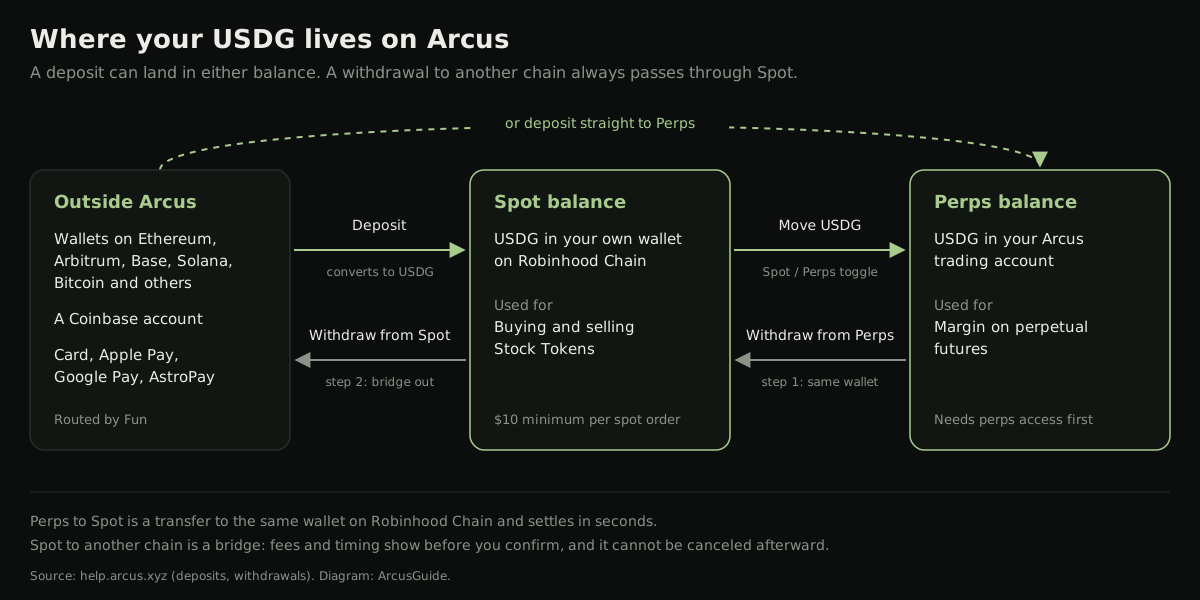
Step 1: Withdraw from Perps. This moves USDG from your Perps balance to your Spot balance, the same wallet on Robinhood Chain. You can't change the destination, and there's no bridge or lockup. It takes a few seconds, and there is no minimum.
Step 2: Withdraw from Spot. Your Spot funds are already on Robinhood Chain, so this flow bridges them out. You choose the asset and destination chain, and the screen shows the bridge fee, gas estimate and total received before you confirm. Arcus sets no protocol-level maximum, though a bridge may cap a route based on its liquidity. The interface shows any route limit.
Cashing out to a bank goes through the same Fun ramp in reverse, converting USDG to your local currency where your region supports it.
Withdrawals are final
Once you confirm, a withdrawal executes and can't be canceled. A bridged withdrawal can't be reversed after you sign. Check the chain and the address twice, and send a small test amount the first time you use a new destination.
Why a withdrawal fails
Per the Help Center, a Perps to Spot withdrawal only fails when you don't have enough free collateral: open positions or resting orders are using it as margin. Cancel orders or reduce positions, then try again. Remember that free collateral on stock perps drops at the US market close, because initial margin rises while the underlying is closed.
A bridge out can also fail for reasons outside Arcus: congestion on the destination network, a bridge being unavailable, or an unsupported chain and asset pair.
Where to get help
- Deposit or withdrawal problems: Arcus's Help Center sends these to Fun. Fun's own support desk is reached through Fun's help guide, which Arcus describes as staffed around the clock.
- Account questions (referral deadlines, liquidation disputes): Arcus lists support@arcus.xyz.
Real support staff will never ask for your seed phrase, a private key or a "verification" signature. Anyone who DMs you first is almost certainly running a scam; our Arcus scams guide shows what they look like.
Common snags and fixes
- The deposit button is missing or blocked. You are probably connecting from a restricted region. See Arcus not available in your country?.
- The deposit hasn't arrived. Check that you sent on the chain you selected and above the on-screen minimum. Ethereum and Bitcoin take longer. If it is still missing, contact Fun with the transaction hash.
- I bought a Stock Token and can't move it. Part of the purchase may still be unsettled. Arcus says delivery takes about 3 to 15 minutes when it isn't instant, and unsettled quantity can't be sold or transferred until then.
- Spot USDG won't buy perps. Use the Spot / Perps toggle first. Perps also need access via an invite code or the waitlist.
- My withdrawal says insufficient collateral. Open orders or positions are holding it as margin.
- The card fee looks high. It is the processor's fee, about 2.1% for cards. A stablecoin transfer from a low-fee chain costs far less.
Once you're funded, the beginner's guide to trading on Arcus picks up from your first Stock Token trade, and Arcus fees explained covers what trading costs once the money is in.
Trade Arcus for 5% less
Join with code ARCUSGUIDE and Arcus takes 5% off your trading fees, automatically. It costs nothing, and the code attaches at signup, so add it on day one.
Get 5% Off Arcus FeesFrequently Asked Questions
USDG, the Global Dollar stablecoin issued by Paxos. Whatever you deposit, whether USDC, ETH, BTC, a Coinbase balance or a card payment, is converted to USDG on the way in. Stock Tokens trade against USDG, and perps are quoted, margined and funded in it.
Arcus says it charges no deposit or withdrawal fee of its own. Third-party costs still apply and are shown before you confirm: about 2.1% for cards, Apple Pay and Google Pay, about 0.5% for SEPA, plus network and bridge fees on crypto routes.
Arcus splits withdrawals into two steps. Withdraw from Perps moves USDG to your Spot balance, which is your own wallet on Robinhood Chain. Withdraw from Spot then bridges it to another chain and asset. The first step takes seconds; the second depends on the destination network.
From fast networks such as Arbitrum, Base or Solana, Arcus's Help Center says a deposit takes seconds. Ethereum mainnet is slower because a transfer has to clear there first. A Coinbase account connection takes about two minutes. The estimated time for your route is shown before you confirm.
Arcus's Help Center sends deposit and withdrawal problems to its partner Fun, whose support team it describes as available around the clock through Fun's help guide on intercom.help. Never share your seed phrase or sign anything for someone who messages you offering help.
Independent resource: ArcusGuide is an independent, third-party resource operated by Concept211. It is not affiliated with, produced by, reviewed by or endorsed by Arcus Labs Ltd, Arcus Labs Inc., Pocket Protector Labs Inc., dYdX Trading Inc. (dYdX Labs), the dYdX Foundation, Robinhood or any of their affiliates. "Arcus" and related names and marks belong to their respective owners and are used here only to identify the platform this site documents. Read the full disclaimer.
Availability: Arcus perpetual contracts and derivatives trading features are not available to persons in the United States, Canada, the United Kingdom or other restricted or sanctioned jurisdictions, and Arcus restricts spot trading there too. This site is not intended for persons in those jurisdictions. Do not use a VPN or any other tool to get around a regional restriction; Arcus prohibits it.
Not advice: Nothing on this site is legal, tax, financial or investment advice. Descriptions of regulatory status, tax treatment and market availability are general information that varies by jurisdiction and changes over time. Confirm anything that matters to you with a qualified professional and against primary sources. Trading perpetual futures with leverage carries a substantial risk of loss, and past performance does not indicate future results.
Disclosure: this site contains referral links. Joining Arcus with code ARCUSGUIDE takes 5% off your trading fees and earns us a share of the fees Arcus already charges, at no extra cost to you.
Trade Arcus for 5% less
Join with code ARCUSGUIDE and Arcus takes 5% off your trading fees, automatically. It costs nothing, and the code attaches at signup, so add it on day one.
Get 5% Off Arcus Fees