Arcus Not Available in Your Country? What the Region Block Means
Table of Contents
- Which countries Arcus restricts
- How the block works
- Getting around the block is prohibited
- Not a region block? Other access errors
- Perps show "Sign up for early access"
- "This wallet address is not on the whitelist"
- A referral link did not unlock perps
- Nothing happens until you "Enable Trading"
- Spot says "no quotes available"
- Deposits not arriving
- Options if you are in a restricted region
- For readers in eligible countries
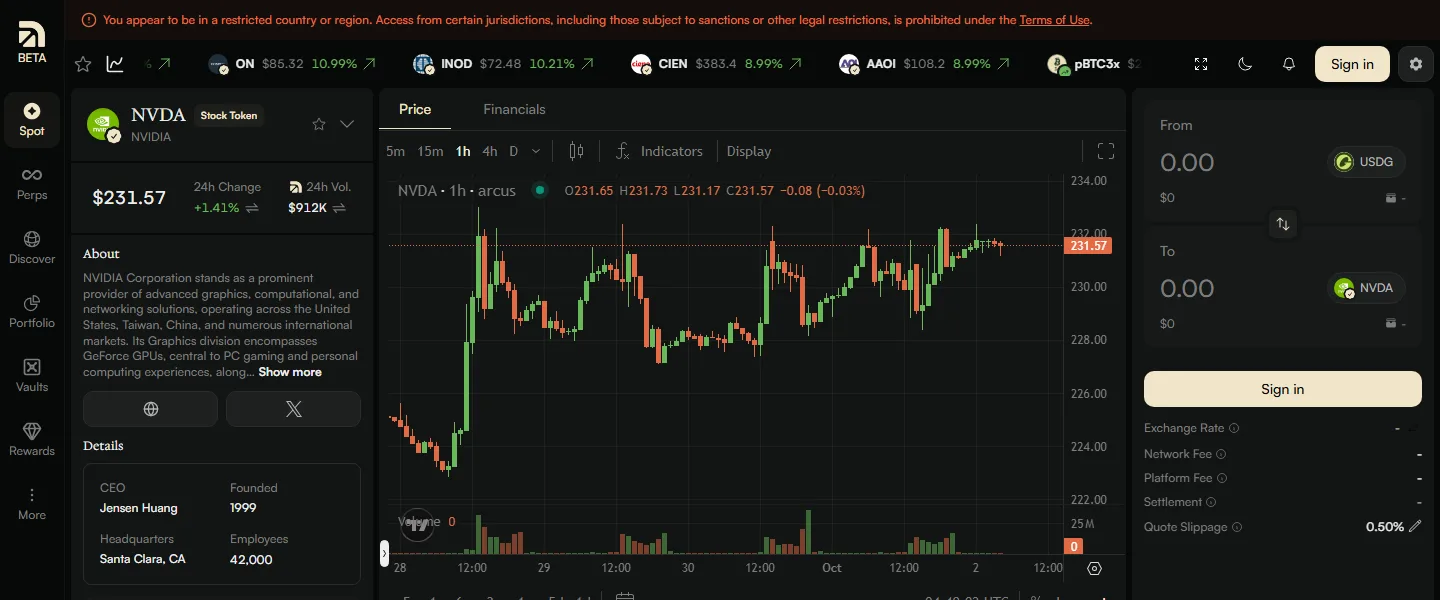
If  the Arcus app greets you with a red line reading "You appear to be in a restricted country or region," the block is not a bug and not a temporary outage. Arcus restricts the United States, Canada, the United Kingdom and sanctioned regions, its Help Center adds Switzerland for spot, and the check runs on your connection's location. This page explains what the banner covers, what Arcus's terms say about getting around it (they prohibit it), and how to tell a region block apart from the far more common access errors that have nothing to do with geography.
Which countries Arcus restricts
Both the Interface Terms and the Protocol Terms carry the same definition of a "Restricted Person." In plain terms, it covers three groups:
| Group | Who it covers |
|---|---|
| Named countries | Anyone who resides in, is located in, is incorporated in, or has a registered office or principal place of business in the United States, Canada or the United Kingdom |
| Sanctions | Any sanctioned person or entity, and any country or region under comprehensive sanctions, "such as Iran, Cuba, North Korea, and the regions of Crimea, Donetsk or Luhansk" |
| Catch-all | "Any other person or entity whose use of the Services would violate any applicable law" |
The terms add: "THERE ARE NO EXCEPTIONS." The Help Center goes one step further for spot: "Arcus Spot is not available in the United States, United Kingdom, Canada, Switzerland and other restricted jurisdictions" (Help Center). Arcus's points and referral programs exclude the US, Canada and the UK as well. The same rules bind affiliates: Arcus's referral terms forbid marketing to restricted persons and require sites like this one to say that Arcus perps are not available in those countries, which is why that notice sits at the foot of every ArcusGuide page.
Note that the definition turns on where you live and where you are. I am not going to tell you how that applies to your situation; that is a question about your own facts and local law.
How the block works
The restriction runs on your IP address. Arcus exposes a public compliance check at api.arcus.xyz/v1/compliance. Called from a Florida connection on 2026-10-02, it returned:
{"geo":{"country":"US","region":"US-FL","restrictions":{"perpetuals":true,"spot":true},"bypassed":false}}
Two things follow from that response.
Spot is blocked too. Section 6.3 of the Protocol Terms says US, Canadian and UK persons may not use perps and "may access spot trading features of the Protocol only to the extent permitted by applicable law." Some readers take that as a green light for spot. In practice the app blocks both, the Restricted Person definition bars those persons entirely, and the compliance check sets "spot":true for a US connection. Plan on neither product being available.
The waitlist does not override it. The Help Center is explicit: "A waitlist position does not override regional restrictions." A waitlist slot or invite code obtained elsewhere does not change what you see from a restricted region.
You can still browse prices and docs. The app loads, charts render, and the banner sits on top. Signing in and trading are where the restriction bites.
Getting around the block is prohibited
This is the part where some websites start recommending VPN products. This one will not. Arcus's terms are unambiguous:
"USE OF A VIRTUAL PRIVATE NETWORK ("VPN") OR ANY SIMILAR TOOL TO CIRCUMVENT OR ATTEMPT TO CIRCUMVENT ANY RESTRICTION SET FORTH IN THESE TERMS IS STRICTLY PROHIBITED. ANY PERSON IN VIOLATION OF THESE TERMS MAY HAVE THEIR WALLET ADDRESS BLOCKED FROM INTERACTING WITH THE PROTOCOL, THEIR API ACCESS REVOKED, AND BE PROHIBITED FROM ACCESSING THE SERVICES, IN EACH CASE IN OUR SOLE DISCRETION."
Section 6.5 of the Protocol Terms repeats it as a promise every user makes: "You do not and will not use VPN software or any other privacy or anonymization tools or techniques to circumvent, or attempt to circumvent, any restrictions that apply to the Services." Annex C adds that the points program is closed to restricted persons, so points earned in breach of the terms are exposed to Arcus's broad right to revoke them.
In practical terms, the consequences Arcus lists are a blocked wallet address, revoked API access and a ban from the services. Arcus's referral terms also forbid affiliates like this site from suggesting VPN use, and ArcusGuide does not offer workarounds of any kind.
Already holding Stock Tokens?
Not a region block? Other access errors
If you are in an eligible country and something still stops you, the cause is usually one of the messages below. Here is the quick map, with details after it.
| What you see | What it means | What to do |
|---|---|---|
| "You appear to be in a restricted country or region" | Your connection is in a restricted region | Nothing on Arcus; see the options section below |
| "Sign up for early access" over the perps chart | Perps are gated in beta | Use an invite code or join the waitlist |
| "This wallet address is not on the whitelist" | Approved address and connected address differ | Reconnect with the wallet you signed up with |
| "Perpetuals access is limited to approved waitlist members" | No perps access on this wallet yet | Invite code, or wait for your cohort |
| Trading buttons do nothing after connecting | Trading not enabled yet | Complete the Enable Trading signature |
| "No quotes available" on a Stock Token | No maker is quoting that name right now | Try a smaller size or come back in US hours |
| "You're already linked to a referrer" | A referral is already attached | Nothing; referrals cannot be changed later |
Perps show "Sign up for early access"
Arcus perps are in beta and gated. Without access, the perps page shows a "Sign up for early access" panel over a blurred chart with three buttons: Join Waitlist, I have an Invite Code, and I am whitelisted already, skip to sign in.
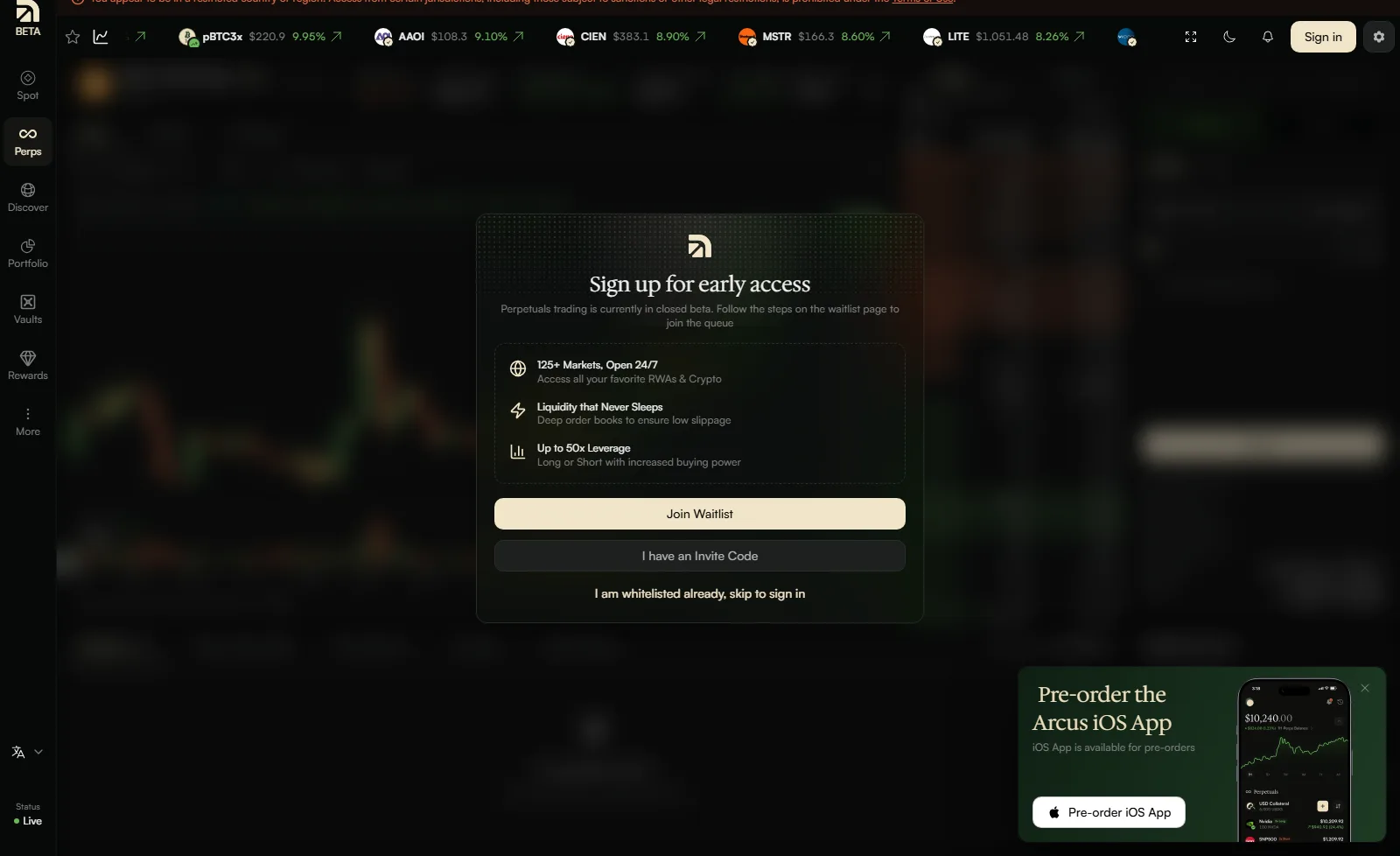
Since October 1, 2026, access works through invite codes. Existing traders earn one code per $1M of qualifying perps volume, codes are single-use, and Arcus says they cannot be sold. The waitlist still exists for people without a code. Spot Stock Tokens need neither: in an eligible region, spot is open to everyone. The full mechanics are in Arcus invite codes and the perps waitlist.
"This wallet address is not on the whitelist"
You were approved, but you connected a different wallet. Arcus approves a specific address. The Help Center's advice when your cohort is called is to use "the wallet you signed up with." If you joined the waitlist with one wallet and now trade from another, switch back. Cohort invitations also carry a deadline: you have one week to act once notified, after which the slot can move.
A referral link did not unlock perps
That is expected. A referral link such as app.arcus.xyz/ref/CODE attaches you to a referrer and, per Arcus, gives you a 5% trading fee discount. It is not an invite code and does not grant perps access. The ARCUSGUIDE referral code explains what a referral does and does not do.
Nothing happens until you "Enable Trading"
Connecting a wallet is step one. Before you can trade, create a referral code or see your invite codes, Arcus asks you to enable trading:
Connect
Connect your wallet and sign the login message.
Enable Trading
Click Enable Trading and tick the Terms of Use checkbox.
Sign
Confirm the second signature in your wallet. It creates the API key the web app uses for your account.
Fund
Deposit USDG, then move it to the Perps balance if you want to trade perps.
These signatures are off-chain messages and cost no gas. If your wallet popup never appeared, check for a blocked popup or a wallet extension that is locked.
Spot says "no quotes available"
Also not a block. Spot runs on quotes from market makers, and thin names can briefly return no quote, especially overnight and on weekends. Arcus says less liquid names quote 24/5 and rest over the weekend. Trading stocks 24/7 on Arcus explains the hours.
Deposits not arriving
Deposits and withdrawals run through Arcus's provider, Fun, and have their own minimums and timing. A crypto deposit has a minimum of about $3 on most chains (higher on Ethereum and Bitcoin), and Ethereum mainnet transfers take longer than the others. Withdrawing perps funds to another chain is a two-step job: Perps to Spot first, then Spot out. A withdrawal can also fail if the funds are still backing open positions or orders. How to deposit and withdraw on Arcus covers each case.
Trade Arcus for 5% less
Join with code ARCUSGUIDE and Arcus takes 5% off your trading fees, automatically. It costs nothing, and the code attaches at signup, so add it on day one.
Get 5% Off Arcus FeesOptions if you are in a restricted region
If the banner is real for you, Arcus is not an option right now. A few neutral points may help you decide what to look at instead. None of this says any particular product is lawful for you; check your local rules first.
Other DEXs restrict the same places. Switching to another perp DEX rarely changes the picture.  Hyperliquid's terms bar US persons and its app checks for US IPs;
  Lighter returns an error to US connections;
  Aster's app is withdraw-only from US IPs. ArcusGuide's research found that every perp DEX it compared bars US persons from perps.
Licensed brokers in your own country. For stock and ETF exposure, the mainstream route is a broker authorized by your national regulator. Many offer some form of extended-hours trading; check what each one actually offers. Every major regulator publishes a register you can search before you sign up, for example FINRA BrokerCheck in the US, the FCA Financial Services Register in the UK, CIRO's dealer lookup in Canada and FINMA's list of authorized institutions in Switzerland.
Watch for changes. Arcus says the Terms of Use are "the source of truth on eligibility" and are updated when things change. If availability in your country ever changes, the terms will say so first. Until then, treat anyone promising a way in as someone selling you a breach of the terms, or a scam (Arcus scams and fake sites covers the common ones).
For readers in eligible countries
If you are outside the restricted list and the banner does not appear, you can start with spot today. What is Arcus covers the product and how to trade on Arcus covers your first session. You can open Arcus here.
Eligible region? Start with spot today
Open Arcus with code ARCUSGUIDE and Arcus applies its 5% referral discount on trading fees. Spot Stock Tokens need no invite code or waitlist.
Open Arcus with ARCUSGUIDEArcusGuide earns a share of the trading fees paid by accounts that join with code ARCUSGUIDE. This page is general information, not legal advice. Arcus perpetual contracts and derivatives features are not available to persons in the United States, Canada, the United Kingdom or other restricted jurisdictions, and this content is not intended for them.
Frequently Asked Questions
Arcus's terms bar anyone who resides in, is located in or is incorporated in the United States, Canada or the United Kingdom, anyone subject to sanctions, and comprehensively sanctioned places such as Iran, Cuba, North Korea, Crimea, Donetsk and Luhansk. The Help Center also lists Switzerland as restricted for spot trading.
In practice, no. One clause of the Protocol Terms mentions spot access only to the extent permitted by law, but the Restricted Persons definition bars US persons entirely, and Arcus's own compliance check returned restrictions on both perpetuals and spot for a US connection on 2026-10-02.
Arcus's terms say using a VPN or similar tool to get around a restriction is strictly prohibited, and that anyone in violation may have their wallet address blocked from the protocol, their API access revoked and be barred from the services. ArcusGuide does not help with getting around regional restrictions.
Arcus perps are in beta and gated. You need an invite code from an existing trader or an approved waitlist slot, and you must connect with the same wallet that was approved. Spot Stock Tokens need neither in eligible regions. You also need to complete the Enable Trading signature before trading.
No. This page describes what Arcus's terms and app say. Whether any platform is lawful for you depends on your local rules and circumstances, so check with your national regulator or a qualified lawyer.
Independent resource: ArcusGuide is an independent, third-party resource operated by Concept211. It is not affiliated with, produced by, reviewed by or endorsed by Arcus Labs Ltd, Arcus Labs Inc., Pocket Protector Labs Inc., dYdX Trading Inc. (dYdX Labs), the dYdX Foundation, Robinhood or any of their affiliates. "Arcus" and related names and marks belong to their respective owners and are used here only to identify the platform this site documents. Read the full disclaimer.
Availability: Arcus perpetual contracts and derivatives trading features are not available to persons in the United States, Canada, the United Kingdom or other restricted or sanctioned jurisdictions, and Arcus restricts spot trading there too. This site is not intended for persons in those jurisdictions. Do not use a VPN or any other tool to get around a regional restriction; Arcus prohibits it.
Not advice: Nothing on this site is legal, tax, financial or investment advice. Descriptions of regulatory status, tax treatment and market availability are general information that varies by jurisdiction and changes over time. Confirm anything that matters to you with a qualified professional and against primary sources. Trading perpetual futures with leverage carries a substantial risk of loss, and past performance does not indicate future results.
Disclosure: this site contains referral links. Joining Arcus with code ARCUSGUIDE takes 5% off your trading fees and earns us a share of the fees Arcus already charges, at no extra cost to you.
Trade Arcus for 5% less
Join with code ARCUSGUIDE and Arcus takes 5% off your trading fees, automatically. It costs nothing, and the code attaches at signup, so add it on day one.
Get 5% Off Arcus Fees